How to Vibe Code Your Author Website
Build your own site, with K.A. Seger and K.S. Valentina as your real-world examples.
What you’ll work toward
A responsive author website, tested links, a connected domain, and a repeatable update process.
Before you begin
No coding experience. Bring a computer, access to Codex or an equivalent coding tool, and public book information and assets you have permission to use. Main path: a static site and Netlify. Cowork and framework hosting are explained as alternatives. Services and domains are separate costs.
Your pace: Allow several sessions for building and testing; domain propagation and account setup can add waiting time. Lesson times below estimate reading plus a short exercise; building your real project will take longer.
Two authors. Two useful structures.
Study the actual sites, then use the small HTML/CSS adaptations to practice safely. The production sites use Next.js and a build process; the beginner downloads intentionally do not.
K.A. Seger
A focused universe with two reading paths
Reader promise
The opening identifies the apocalypse universe and makes a series choice the next action.
Open the actual websiteSource reviewed: 4703b0a · August 31, 2026These examples teach decisions visible in the inspected source. They are not a claim that either site guarantees sales, search rankings, or identical behavior in every browser.
See the decision on the page
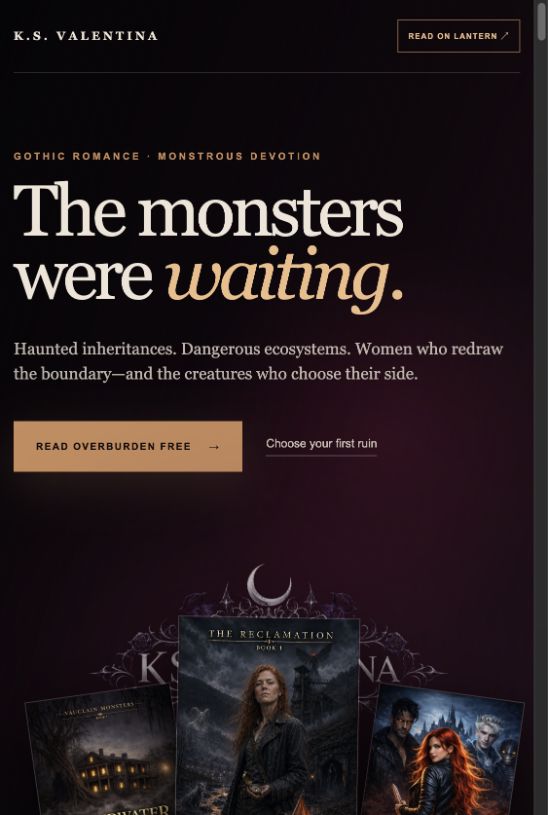
1. Give readers a next action
The real K.S. homepage pairs a genre promise with Read Overburden free. The lesson is the connection between the promise and the next action, not copying its text.
Select the image to enlarge. Live content can change after capture.
Your project files
Two real-site adaptations, a plain starting checkpoint, a styled checkpoint, a broken practice copy, and an answer key. Use your own identity before publishing.
Open the K.A. study adaptation · Open the K.S. study adaptation
Keep the untouched download as your recovery copy. The study files are deliberately separate from the live projects. Course notes save in this browser; use Resource library → My workbook → Save backup to move progress between devices. There is no automatic cloud sync or Skool enrollment connection.